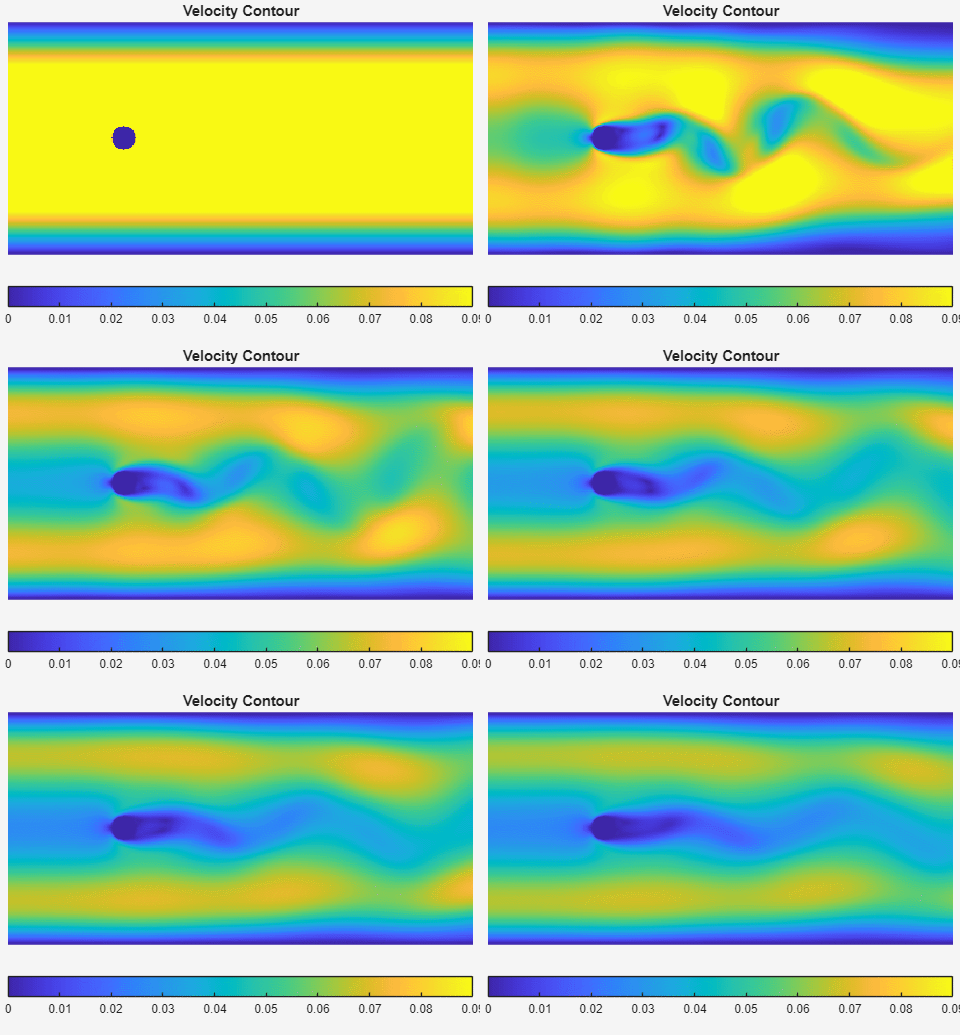
Velocity Field
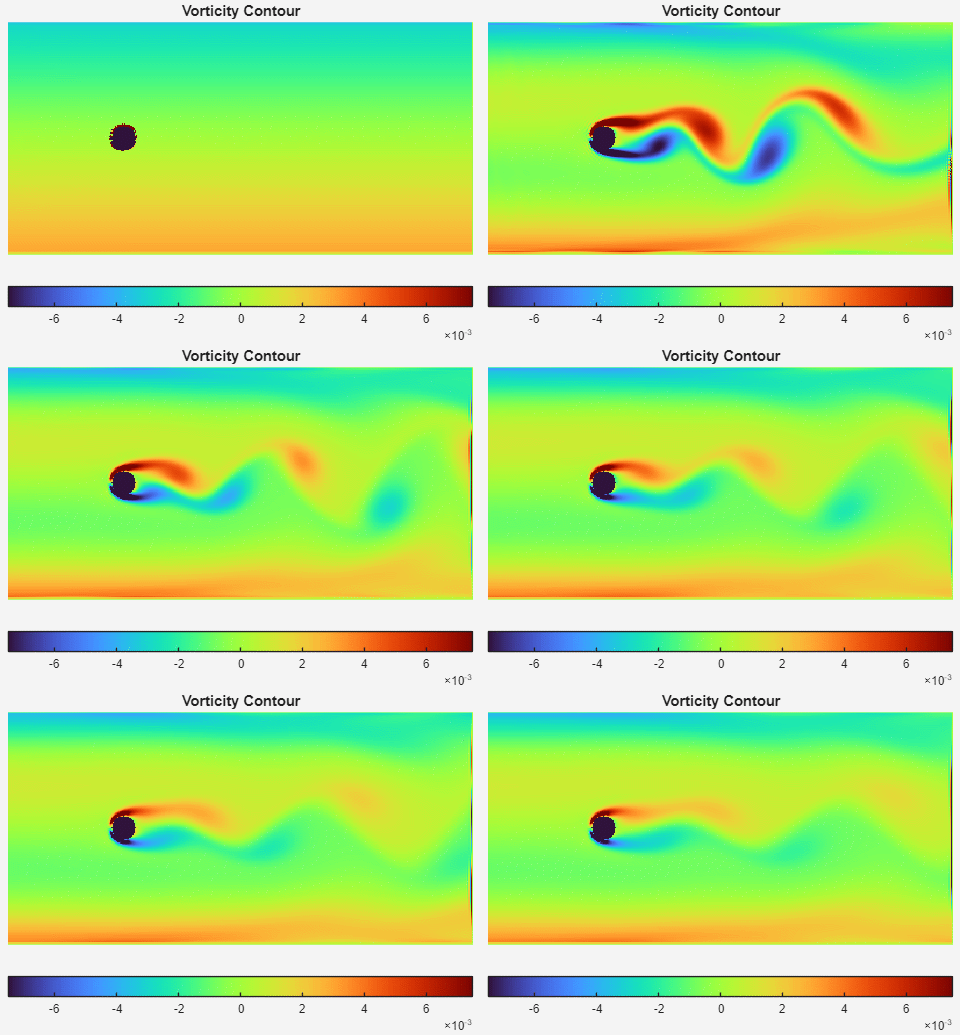
Vorticity Field
2D Lattice Boltzmann Method Flow Simulation (MATLAB)
This project demonstrates a compact implementation of a two-dimensional Lattice Boltzmann Method (LBM) solver written in MATLAB.
The simulation models incompressible channel flow past a circular obstruction and reproduces the classical Kármán vortex street, a periodic vortex shedding phenomenon observed behind bluff bodies.
The goal of this project is to provide a clear and accessible example of how the LBM algorithm works in practice. With only a few hundred lines of MATLAB code, the implementation demonstrates the core components of a typical LBM solver.
Key elements included in the implementation:
This code is intended for students and researchers who want to quickly understand how an LBM solver is structured.
The simulated flow corresponds to 2D channel flow past a circular cylinder.
At moderate Reynolds numbers (default Re = 200), the wake behind the cylinder becomes unstable and produces periodic vortex shedding, forming the well-known Kármán vortex street.
Key features of the setup:
The simulation uses the D2Q9 Lattice Boltzmann model with a single-relaxation-time BGK collision operator.
The discrete lattice velocities are
\[c_i = \begin{cases} (0,0) & i = 0 \\ (\pm1,0),(0,\pm1) & i=1\sim4 \\ (\pm1,\pm1) & i=5\sim8 \end{cases}\]The evolution equation is
\[f_i(x + c_i \Delta t, t + \Delta t) = f_i(x,t) - \Omega \left(f_i - f_i^{eq}\right)\]where
The equilibrium distribution is
\[f_i^{eq} = \rho w_i \left( 1 + 3(c_i \cdot u) + \frac{9}{2}(c_i \cdot u)^2 - \frac{3}{2}u^2 \right)\]Macroscopic variables are obtained from distribution moments
\[\rho = \sum_i f_i\] \[\mathbf{u} = \frac{1}{\rho} \sum_i f_i \mathbf{c}_i\]In the BGK LBM model, the kinematic viscosity is related to the relaxation time:
\[\nu = c_s^2 \left(\tau - \frac{1}{2}\right)\]For the D2Q9 model
\[c_s^2 = \frac{1}{3}\]Thus
\[\nu = \frac{1}{3}\left(\tau - \frac{1}{2}\right)\]which gives
\[\tau = 3\nu + \frac{1}{2}\]This relation is used to convert a target viscosity into the relaxation parameter used in the solver.
More details about the Lattice Boltzmann method can be found here:
https://en.wikipedia.org/wiki/Lattice_Boltzmann_methods
The MATLAB code is organized into several sections corresponding to the key steps of the LBM algorithm.
This section defines the computational domain and the physical flow parameters.
| Parameter | Description |
|---|---|
| lx | number of lattice nodes in x direction |
| ly | number of lattice nodes in y direction |
| Re | Reynolds number |
| uMax | maximum inlet velocity |
| obst_x | x location of cylinder center |
| obst_y | y location of cylinder center |
| obst_d | cylinder diameter |
All parameters can be adjusted to explore different flow regimes.
In particular, the Reynolds number strongly affects wake dynamics.
Typically
Re > 150
is sufficient to observe a clear Kármán vortex street.
However, increasing Re also requires higher spatial resolution (larger lx and ly).
If the grid is too coarse, the simulation may become unstable or crash due to numerical instability.
The cylinder diameter should also not be too large relative to the channel height, otherwise the wake may be artificially constrained by the channel walls.
This section defines numerical parameters used in the solver.
The Reynolds number relation
\[Re = \frac{U D}{\nu}\]is rearranged to determine viscosity
\[\nu = \frac{U D}{Re}\]The relaxation time is then computed
\[\tau = 3\nu + \frac{1}{2}\]and the collision relaxation parameter is
\[\Omega = \frac{1}{\tau}\]The relaxation time affects both stability and accuracy.
Recommended range: 0.51 < τ < 1.5
The code includes a simple check to ensure τ stays within this range.
This section defines constants used by the D2Q9 lattice.
w : lattice weights used in equilibrium distributioncx, cy : discrete velocity directionsopp : opposite lattice directions used in bounce-back boundary conditionsThese constants define the structure of the lattice Boltzmann model.
The particle distribution functions are initialized assuming
ρ = 1 u = 0
Two additional arrays are allocated:
fEq – equilibrium distributionfOut – post-collision distributionThese arrays are repeatedly used inside the simulation loop.
For comparison purposes, the analytical Poiseuille velocity profile is computed.
Because bounce-back walls lie halfway between nodes, the effective wall locations are
y = 0.5 y = ly − 0.5
The resulting parabolic profile is used later as a reference solution when comparing velocity profiles inside the channel.
The channel flow is driven by a small pressure difference.
For plane Poiseuille flow
\[\Delta P = \frac{8 U L_x \nu}{L_y^2}\]In LBM
\[p = c_s^2 \rho = \frac{1}{3}\rho\]Thus
\[\Delta \rho = 3 \Delta P\]The inlet and outlet densities are defined as
rho_in rho_out
which are later used in Zou/He pressure boundary conditions.
The computational grid and the circular obstruction are defined.
Nodes inside the cylinder are marked as solid nodes and treated using bounce-back boundary conditions.
Similarly, the top and bottom walls are also marked as bounce-back regions.
These indices are stored so that boundary conditions can be efficiently applied during the simulation.
To accelerate convergence, the simulation starts from a Poiseuille-like velocity field instead of a zero velocity field.
This initialization helps the wake develop more quickly.
Since solid boundaries use bounce-back boundary conditions, velocities on
are explicitly set to zero.
Finally, the equilibrium distribution is rebuilt using the initialized macroscopic variables.
The main simulation procedure is implemented inside the loop
for cycle = 1:maxT
Each iteration performs the standard LBM update sequence:
The collision step relaxes the particle distributions toward equilibrium:
\[f_i^{post} = f_i - \omega \left( f_i - f_i^{eq} \right)\]This represents particle interactions and drives the distribution toward equilibrium.
After collision, distributions propagate to neighboring nodes:
\[f_i(\mathbf{x} + \mathbf{c}_i \Delta t,\; t + \Delta t) = f_i^{post}(\mathbf{x}, t)\]This step represents particle motion across the lattice.
Solid boundaries (cylinder and channel walls) use the bounce-back scheme
\[f_i = f_{\text{opp}(i)}\]which enforces a no-slip velocity condition.
The inlet and outlet use pressure boundary conditions proposed by
Zou & He (1997)
https://pubs.aip.org/aip/pof/article-abstract/9/6/1591/260464
Several flow quantities are visualized during the simulation:
These visualizations allow the vortex shedding process and the formation of the Kármán vortex street to be clearly observed.
Velocity Field
Vorticity Field
Hope everyone enjoys this code and begins their journey into the fascinating world of the Lattice Boltzmann Method.